
Overview
The Webhook Service provides reliable, asynchronous delivery of event data from our backend to your configured webhook endpoints. Rather than relying on real-time SDK callbacks, this service delivers structured event notifications (such as status updates, receipt processing results, or other business events) to your server via HTTP webhooks, offering enhanced reliability, delivery guarantees, and robust retry mechanisms.
Key Benefits
- Reliable Delivery: Automatic retry logic with exponential backoff ensures your data is delivered (See: Failure Handling for more details)
- Asynchronous Processing: Decouple receipt processing from user interactions for better performance
- Audit Trail: Track all delivery attempts and status changes for debugging and compliance
- Flexible Configuration: Subscribe to specific event types and customize webhook headers
- Reprocessing Support: Request redelivery of historical receipts when needed
How It Works
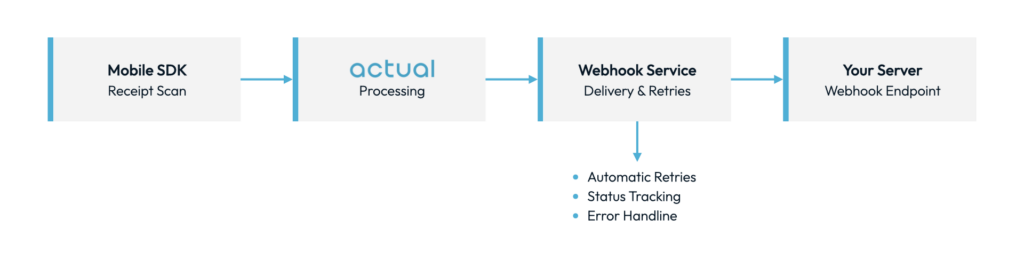
- Your mobile app scans a receipt using our SDK
- Receipt data is processed on our server
- The Webhook Service delivers the data to your configured endpoint
- Your server receives the webhook and processes the receipt data
- If delivery fails, the system automatically retries with exponential backoff
Getting Started
Prerequisites
- Active Microblink client account
- API and SDK credentials (API and SDK keys)
- HTTPS endpoint capable of receiving webhook POST requests
- Valid SSL certificate on your webhook endpoint
Go-Live Checklist
- Build Your Webhook Handler – See Receiving Webhook Events for more details
- Analyze Event Types – Choose which events you want to receive (See: Event Types for more details)
- Configure Your Webhook Endpoint – See Webhook Configuration
Receiving Webhook Events
Webhook Request Format
When an event occurs, our system will send a POST request to your configured webhook URL.
Headers
POST /webhooks/microblink HTTP/1.1
Host: your-domain.com
Content-Type: application/json
X-Webhook-ID: webhook-id-123- Custom headers: Any headers you configured will also be included
Webhook Payload Structure
{
  "blink_receipt_id": "receipt-uuid-123",
  "version": 1,
  "payload_type": "ReceiptProcessed",
  "payload_data": {
    // Structure depends on payload type
    // See Event Types section for details
  }
}Field Descriptions
| Field | Type | Description |
|---|---|---|
blink_receipt_id | string | Unique identifier for the receipt in our system |
version | number | Payload type version |
payload_type | string | The type of payload (matches your subscription) |
payload_data | object | Payload data |
Responding to Webhooks
Your endpoint must respond to webhook requests to indicate successful receipt.
Success Response
Respond with HTTP status code 200–299 to indicate successful receipt:
HTTP/1.1 200 OK
Content-Type: application/json

{
  "received": true
}Response Requirements:
- Must respond within 30 seconds (timeout)
- Status code must be 2xx (200–299)
- Response body is optional but recommended for debugging
Failure Handling
If your endpoint returns a 4xx or 5xx status code, times out (>30 seconds), or is unreachable, our system will automatically retry with the following schedule:
| Attempt | Wait Time | Timeout |
|---|---|---|
| 1 (initial) | – | 30 seconds |
| 2 (retry 1) | 5 seconds | 30 seconds |
| 3 (retry 2) | 15 seconds | 30 seconds |
| 4 (retry 3) | 45 seconds | 30 seconds |
After 3 failed retry attempts, the webhook is marked as failed and moved to a dead letter queue for manual investigation.
Idempotency
To ensure reliability, you should design your webhook handler to be idempotent. This way, if the same webhook payload is delivered multiple times (such as during rare retry scenarios after network issues), your system can safely handle or ignore duplicates without unintended side effects.
Event Types
Subscribe to specific event types to receive only the data you need. Event types follow the CamelCase format.
Available Event Types
| Event Type | Description | Version |
|---|---|---|
ReceiptProcessed | A new receipt has been successfully processed | 1 |
RewardUpdated | An existing reward has been updated | 1 |
Detailed Event Type Reference
ReceiptProcessed
Description: Triggered when a new receipt is successfully scanned and processed.
Sources:
- Paper receipt scanning (mobile SDK)
- Email receipt parsing
- Account-linked purchase data (ALP)
Payload Structure:
{
  "version": 1,
  "blink_receipt_id": "UUID - Primary Blink Receipt ID",
  "payload_type": "Event Type - See Event Types section for details",
  "payload_data": {
    "receipt_metadata": {
      "receipt_type": "Type of receipt format (e.g., digital, paper)",
      "global_receipt_id": "Global unique identifier for the receipt",
      "blink_receipt_id": "UUID - Primary Blink Receipt ID",
      "original_blink_receipt_id": "Original Blink Receipt ID if duplicated",
      "email_metadata": {
        "email_timestamp": "Timestamp email was received",
        "email_id": "Email unique ID",
        "email_client": "Email client used to send the message",
        "email_sender": "Email sender address",
        "email_subject": "Email subject line"
      },
      "parse_metadata": {
        "parse_method": "How the receipt was parsed",
        "parse_timestamp": "Timestamp when the receipt was parsed",
        "country_code": "Country code (e.g.: US)",
        "parser_version": "Internal version of the parser used"
      },
      "flags": {
        "is_receipt": "Whether this was successfully classified as a receipt",
        "is_instacart_shopper": "Flag indicating if an Instacart shopper submitted the receipt",
        "fraud_detected": "Flag for internal fraud detection",
        "fraud_reason": "Optional reason for fraud flag",
        "is_duplicate": "Flag to indicate if this is a duplicate receipt",
        "duplicate_blink_receipt_ids": "Array of UUIDs for duplicate receipts"
      },
      "version": "API response schema version used for this payload"
    },
    "merchant": {
      "name": "Merchant or store name",
      "client_name": "Normalized merchant name used by client",
      "sub_merchant": "In case of delivery platforms (e.g., DoorDash > Chipotle)",
      "mall_name": "If inside a mall, the name of mall",
      "tax_id": "Taxpayer ID of the merchant",
      "channel": "merchant channel (grocery, mass, qsr, etc.)",
      "location": {
        "address": "Street address of the store",
        "city": "City where the store is located",
        "state": "State where the store is located",
        "zip_code": "ZIP or postal code",
        "store_phone_number": "Merchant's store location phone number",
        "store_number": "Store number or ID"
      }
    },
    "payment": {
      "method": "Method of payment (e.g., credit_card, cash)",
      "card_type": "Type of card used (e.g., Visa, MasterCard)",
      "card_issuer": "Issuer of the payment card",
      "last_4_digits": "Last 4 digits of the card",
      "terminal_id": "Terminal ID (if available)",
      "cashback": "Cashback earned or redeemed"
    },
    "charges": {
      "totals": {
        "subtotal": "Subtotal amount before tax and discounts",
        "discount_total": "Total discount amount",
        "rounding_adjustment": "Rounding adjustment amount if applicable",
        "total": "Total amount charged",
        "taxes": "Total taxes applied to purchase",
        "fees": "Total fees applied to purchase",
        "tip": "Tip amount"
      },
      "fees": [
        {
          "type": "Type of fee (e.g., bag_fee, delivery_fee)",
          "description": "Description of fee, extracted from receipt",
          "amount": "Fee amount",
          "scope": "order | item"
        }
      ],
      "currency_code": "Currency code"
    },
    "purchase": {
      "order_number": "Merchant-issued order number",
      "status": "ordered, shipped, refunded, returned, etc.",
      "purchase_date": "Date the purchase was made",
      "purchase_time": "Time the purchase was made",
      "transaction_id": "Primary transaction ID",
      "long_transaction_id": "Extended transaction ID",
      "cashier_id": "Cashier or operator ID",
      "register_id": "Register ID",
      "loyalty_number": "Loyalty program member number",
      "purchase_time_string": "Purchase time formatted as string",
      "purchase_time_hh_mm": "Purchase time formatted to HH:MM",
      "loyalty_program": "Is a loyalty purchase (Bool)",
      "unqualified_promotions": "Promotion IDs that did not qualify",
      "qualified_promotions": "Promotion IDs that qualified",
      "type": "in-store, delivery, pickup, digital, etc."
    },
    "products": [
      {
        "name": "Product description, as extracted from the receipt",
        "number": "Product SKU or internal merchant ID, as extracted from receipt",
        "name_normalized": "Product name, as associated with the UPC",
        "quantity": "Number - Quantity purchased",
        "unit_price": "Float - Price per unit",
        "regular_price": "Float - Regular (non-discounted) price",
        "purchased_price": "Float - Final purchase price, after any discounts/coupons",
        "purchase_status": "ordered, completed, shipped, out for delivery",
        "is_sensitive": "Boolean - Whether the product is considered sensitive",
        "qualified_promotions": "Whether this specific product index qualified for promo",
        "category": "Product category",
        "size": "Size or weight of the product",
        "brand": "Brand of the product",
        "upc": "Universal Product Code",
        "subproducts": []
      }
    ],
    "discounts": [
      {
        "type": "Type of discount (e.g., manufacturer_coupon)",
        "description": "Discount fee, as extracted from the receipt",
        "amount": "Amount of discount applied",
        "scope": "Scope (order or item level)",
        "product_ids": "Reference to product IDs if item level"
      }
    ]
  }
}When to use: Subscribe to this event if you need to process receipts as soon as they’re created.
RewardUpdated
Description: Triggered when an existing reward is updated.
{
  // Updated reward data payload
  // TODO: Add complete schema documentation
}When to use: Subscribe to this event if you need to update your records when reward data changes.
Webhook Configuration
Creating a Webhook Configuration
To start receiving webhooks, give your Microblink Account Management team the following information:
- Which API key to use (share securely or only share last 3 characters)
- Your application’s bundle identifier (e.g.,
com.example.app). If not provided, the webhook will be associated with your web API key ID. - Your webhook endpoint URL (e.g.,
https://your-domain.com/webhooks/microblink) - List of event types to subscribe to (see Event Types). If not provided, the webhook will report all event types.
- Any custom HTTP headers to include in webhook requests (optional)
Security Best Practices
Webhook Endpoint Security
- Use HTTPS Only
- Our system will only deliver to HTTPS endpoints
- Ensure your SSL certificate is valid and not self-signed
- Validate Payload Structure
- Always validate the webhook payload against expected schema
- Reject malformed requests early
- Rate Limiting
- Implement rate limiting on your webhook endpoint
- Protect against accidental or malicious high-volume traffic
Changelog
| Date | Version | Changes |
|---|---|---|
| 2025-10 | 1.0 | Initial release |
Glossary
| Term | Definition |
|---|---|
| Webhook | HTTP callback that delivers data to your server when events occur |
| Job | A webhook delivery task tracked by our system |
| Event Type | Category of webhook event (e.g., ReceiptProcessed) |
| Blink Receipt ID (BRID) | Unique identifier for receipts in our system |
| DLQ | Dead Letter Queue – storage for failed webhook jobs |
| Idempotency | Property that ensures duplicate webhook deliveries are handled safely |